
Digital Business
Cards for C-Suite
Executives:
Smart Networking, Simplified
Discover digital business cards leaders can share in seconds, control from one place, and trust in every high-stakes conversation.

Why C-Suite Executives Need the Best Digital Business Cards Today
At C-suite level, every introduction is a high-stakes moment with investors, board members, partners and senior hires. Digital business cards for C-suite executives give every new contact and recipient a clean, on-brand profile that is easy to save and impossible to misplace.
- Built for modern networking. Share a single digital profile by QR code or secue URL in meetings, at a networking event, or after a new connection on LinkedIn.
- Always up-to-date. Update titles, phone numbers, and contact details once in Wisery and every saved card stays in sync in Google Wallet or Apple Wallet as a secure Apple Wallet Pass.
- On-brand, every time. Keep your visual identity consistent with approved colors, logo, professional headshot, role titles, and other key branding elements instead of a mix of paper cards and one-off designs.
- No app or NFC needed. Wisery runs in the browser, and the digital card lives in Wallet, so executives do not need apps or NFC-enabled devices.
Essential Digital Business
Card Features for C-Suite
Leaders
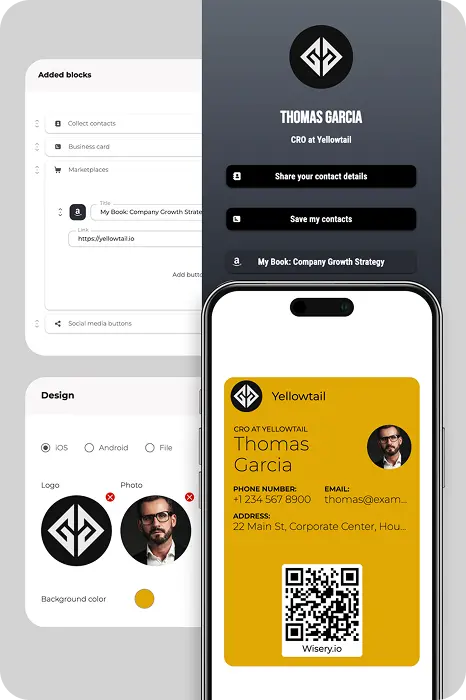
A C-suite business card should make it effortless to recognise the leader, understand their executive position (CEO, COO, CRO), and reach them through the right channel. On each executive’s card, include:
- Full name and title (for example “Chief Executive Officer” or “Chief Revenue Officer”).
- Company name and logo aligned with your brand guidelines.
- Primary contact information: direct phone, work email, and assistant email if needed.
- Links to key social media accounts, especially the LinkedIn account.
- A concise line that explains their focus, such as “Driving long-term growth and partnerships”.
Smart Features Designed for C-Suite Professionals
Wisery combines executive-friendly design with practical control for the people who support them.
- Wallet-based digital business cards. Create cards in the Business cards tab, then share them so executives can add them to Apple Wallet or Google Wallet. Cards work even when connectivity is limited, so the QR code and contact details are ready on the lock screen.
- Contactless sharing. Share a QR code from the phone, send a link after a meeting, or add the card to an email signature for easy contactless sharing.
- Lead capture for key events. Use a Wisery page with a “Collect contacts” button as a simple event lead capture touchpoint so important interactions do not get lost.
- Centralised contact management. Store collected contacts in the Contacts tab,export them to your CRM, and track performance through built-in analytics, each measurable metric, and an executive dashboard.
- Consistent, customizable design. Use the same visual identity across cards, then customize details per leader so every card looks aligned while still personal.
Best Networking Opportunities for C-Suite Leaders
Digital business cards support how executives actually network today and improve measurable networking ROI.
- Executive and industry conferences. Share the card by QR code instead of exchanging a traditional paper business card.
- Investor and board meetings. Follow up with a clean digital profile that includes direct contact details and social links.
- Media and partner interactions. Give journalists and partners a single source of truth for titles, bios, and contact information.
- Internal leadership offsites. Help leaders connect with new team members and regional heads without juggling stacks of paper cards.
- Virtual meetings and webinars. Drop the card link in chat or add the QR code to virtual backgrounds and presentation slides.
How to Create Your Digital Business Card with Wisery
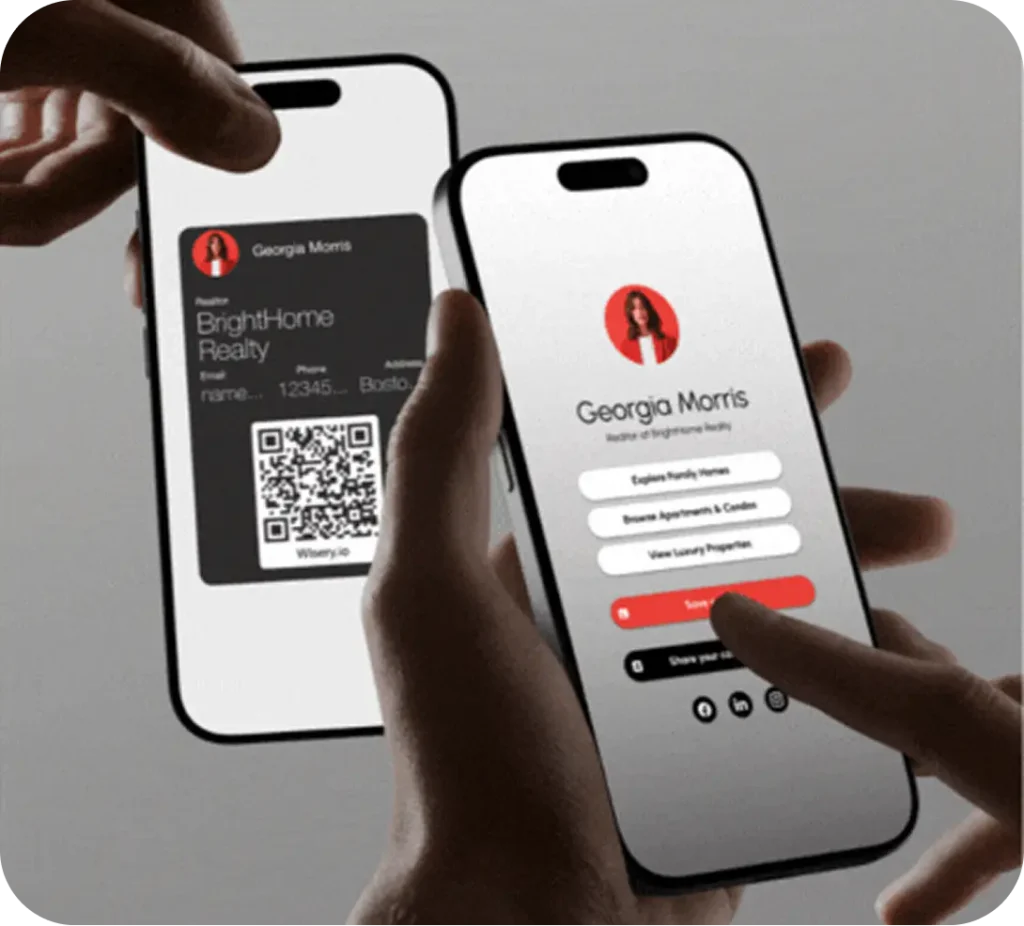
Creating digital business cards for C-suite executives in Wisery takes just a few steps.
- Sign up and create the first card. Go to the Business cards tab and click Create business card. Choose a design for iOS or Android that fits your brand.
- Add executive details. In the General and Design sections, add the leader’s name, role, company, logo, and brand colors so the card matches your visual identity.
- Add contact information and set QR behaviour. In Contacts, add and arrange the right contact details for that leader. In the QR Code section, choose whether the QR sends people to a Wisery page or lets them save contact information straight to their phone.
- Share and add to Wallet. Preview the card, save it, then open Share and send the link to the executive so they can add it to Apple Wallet or Google Wallet from their device.
Design Your Perfect Digital Business Card with Wisery



Julia Ten
“I’ve tried several link in bio tools, but Wisery stands out with its versatility and ease of use. The digital business card feature is a standout, making it incredibly simple to share my contact information. Highly efficient and effective!”
Andrew K.
Vicky H.
Frequently Asked Questions
Are digital business cards secure enough for high-level executives?
Yes. With Wisery, executive cards are shared as a secure link or QR code and saved in Apple Wallet or Google Wallet, protected by device-level security. The platform follows enterprise-grade standards such as SOC 2 and supports GDPR compliance for data handling. If a phone is lost, no extra paper cards or conference badges are left behind, and the card can be removed or updated from the Wisery account at any time.
Can executive assistants manage digital business cards on behalf of C-suite leaders?
Yes. Assistants or marketing teams can create and update digital business cards from a single Wisery account, ensuring scalable management across departments. This simplifies card creation for multiple executives and keeps branding consistent without asking leaders to edit anything themselves.
Can I create different virtual business cards for different roles or audiences?
You can. Wisery lets you create multiple digital business cards within one account, so you can maintain separate versions for different subsidiaries, regions, or roles and use a digital business card that fits each context. Executives can choose which card to share depending on the context while you keep control over the design and wording.
Can I include email signatures and brand assets on my digital business card?
Yes. You can add your company logo, approved imagery, and brand colors directly to the card design, and reuse the card link or QR code in your corporate email signature templates. That way your digital profile, social media accounts, and contact details stay consistent wherever people interact with your brand.
What if I need to update my contact details or change companies?
Simply edit the card in Wisery when roles, phone numbers, or locations change. Anyone who has already saved the card in their Wallet will see the updated information without needing to scan a new QR code, and you can stop sharing a card when an executive leaves the company.
Which digital business card platform is best for C-suite level integration and control?
The best platform is the one that fits your existing workflows. Wisery focuses on digital business cards for C-suite and leadership teams who want Wallet-based cards, browser-based management, and simple sharing options such as QR codes, links, and email signatures. You stay in control of the design and content while executives get a fast, polished networking solution and a smoother user experience overall.