
Chief
Operating
Officer
Business Card:
Go Digital and Network Smarter
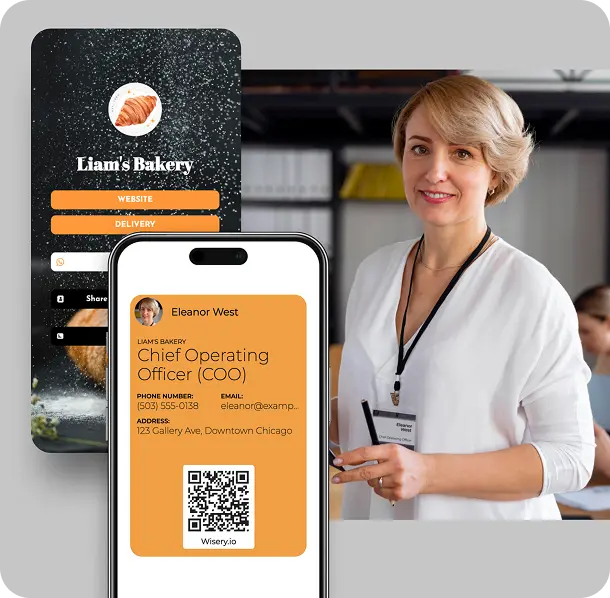
Smart Features Every COO Should Look For
As a COO, your role is dynamic. You manage processes, connect departments, and represent your company at the executive level. Your business card should match that energy. Here’s what to look for in chief operating officer business cards:
Business card scanner
Features for teams
Do you need consistency across your operations or leadership team? Sync team-wide cards with aligned templates, branding, and info blocks.
Strategic partnerships
Add links to pitch decks, contracts, or key documents to speed up decision-making and showcase value instantly.

Impression matters
From dynamic layouts to clickable buttons, your card will feel more like a microsite than a printed rectangle and that’s the point.
These are cards built for action, clarity, and leadership – not just for handing out.
Best Uses of Digital Business Cards for COOs and Executive Leaders
Digital business cards don’t just replace old-school ones, they do more. Here are some real-world scenarios that show why modern COOs are switching:
- Quick scenario: Emily, a COO at a mid-size professional services organization, uses her digital card during interviews with executive hires. It includes her LinkedIn profile, a short introductory video, and her scheduling link. It makes the employee management process more personalized and efficient.
- Corporate partner intro: When meeting with a potential partner to launch a joint product, James shares his card instantly via QR. It includes his corporate title, the project brief, and all contact info – setting the tone for clear, structured leadership from day one.
- Internal onboarding: Sophie leads operations at a growing startup. She uses her card to welcome new hires, giving them one-click access to key tools, her calendar, and a warm welcome video. It’s an example of scaling up culture while staying personal.
- Speaking at an event: At a leadership summit, a COO shares her card with attendees. It highlights her credentials, links to her latest talk, and showcases the company’s milestones, turning a quick scan into a lasting impression.
These are not just cards. They’re tools to personalize outreach, streamline communication, and elevate the way you operate.
Design the Perfect Digital Business Card for a COO
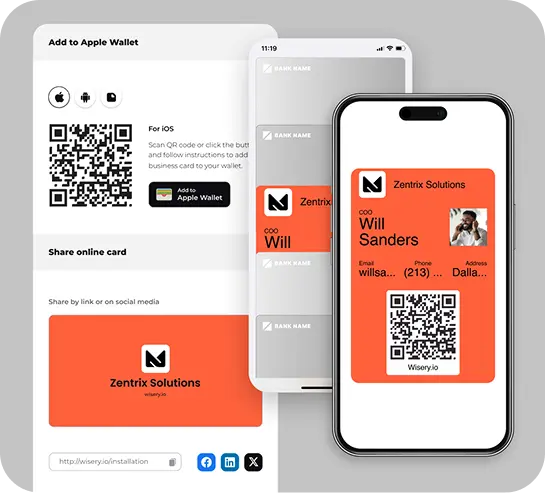
Creating a standout card with Wisery is simple, fast, and designed to reflect your leadership role within the company. Here’s how:
- Sign Up: Create your account and join your company’s workspace, or set one up yourself.
- Choose your COO business card template: Pick a layout that aligns with your brand whether sleek, modern, or bold.
- Add your details: Include your title, contact information, links to tools you use, email address, phone number, calendar link, and a strong introduction.
- Customize your card: Adjust the quality, add a professional headshot, change colors and fonts, and drop in links, files, or even video messages.
- Publish and go live: Generate your personal QR code and URL. Use it at meetings, on LinkedIn, in your email signature – wherever you build relationships.
Pro tip: COO titles vary. Wisery templates are ideal for titles for business owners, managing directors, or heads of operations – flexible and designed for clarity.
Create a COO Business Card with Wisery to Boost Executive Networking
No matter the type of COO – whether you manage supply chains, run finance ops, or lead global expansion, Wisery is designed for you. Our platform facilitates effective networking and helps you establish the right connections through a modern, high-impact card that accurately reflects your role in day-to-day operations.
Let’s say you’re:
- Meeting a Stakeholder for the first time – share your card with your calendar, role details, and case studies.
- Attending networking events: display your QR code so people can scan and connect instantly.
- Collaborating across departments, use your Wisery card to centralize team documents, calls, and introductions.
Plus, Wisery helps with building connections, not just listing them. With a professional business card design, your info looks sharp and is easy to act on. You’re not handing out cards – you’re opening doors.
Design Your Perfect Digital Business Card with Wisery



Julia Ten
“I’ve tried several link in bio tools, but Wisery stands out with its versatility and ease of use. The digital business card feature is a standout, making it incredibly simple to share my contact information. Highly efficient and effective!”
Andrew K.
Vicky H.
FAQ
How much does a COO digital business card cost?
Wisery offers various pricing options to fit different needs, including a free tier with basic features and a Pro with premium options for advanced functionalities. Wisery Pro's average cost is $5.99 per seat per month for monthly billing and $2.99 per seat per month for yearly billing. If your account requires two or more seats, the total cost will vary depending on the selected seats and the billing cycle.
What makes a COO business card different from standard business cards?
A COO business card is customizable to reflect your role, responsibilities, and communication style. Unlike traditional paper business cards, Wisery cards include interactive links, real-time updates, scheduling buttons, and your brand visuals – making it easier to stand out and stay connected with industry peers.
Can I integrate my COO card with meeting links or executive calendars?
Absolutely. Simply navigate to the editor, select the block section, and insert your meeting link as a button. Whether it's Zoom, Calendly, or Google Meet – Wisery makes scheduling effortless. Because keeping strong relationships with clients is part of excellent decision-making.
Is my information protected on a digital COO card?
Yes. Your contact information is stored securely. Wisery uses industry-standard encryption and privacy protocols to ensure trust, data safety, and full responsibility for how your info is shared.
Can I match the COO card design to my company's brand?
Yes, 100%. You can change colors, upload your logo, add your image, insert a branded banner, and align everything with your brand's look and feel. Want to showcase your expertise and leadership? Wisery's design tools help you build a card with effective branding that looks clean, consistent, and on-point.