Business Card Technology
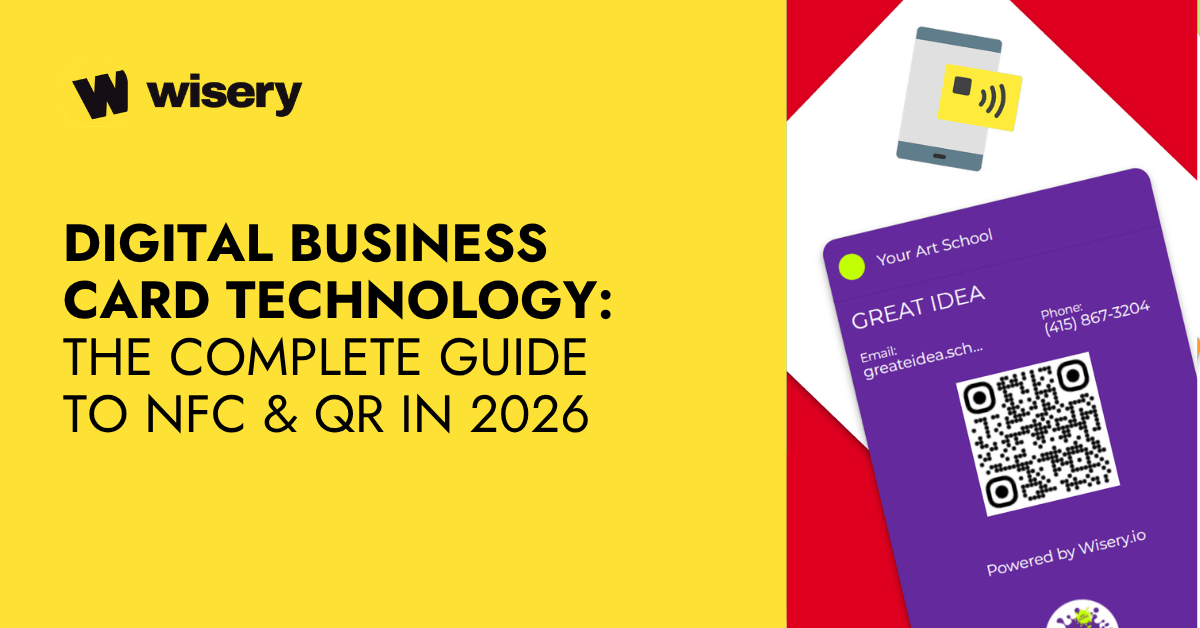
Digital business card technology allows professionals to share contact details through NFC chips, QR codes, and cloud-based profiles. Instead of relying on printed cards, users can instantly transfer vCards, links, portfolios, and CRM-connected data. The strongest solutions combine NFC for fast one-to-one sharing with QR codes for universal access.
So what exactly counts as “business card technology”? It’s basically any system that lets you share professional info without physically handing over paper. Two main players here: NFC chips and QR codes. NFC chips are tiny – we’re talking NTAG series from NXP Semiconductors, embedded right into the card. Hold your card near someone’s phone to let it read the card and instantly open your contact profile.
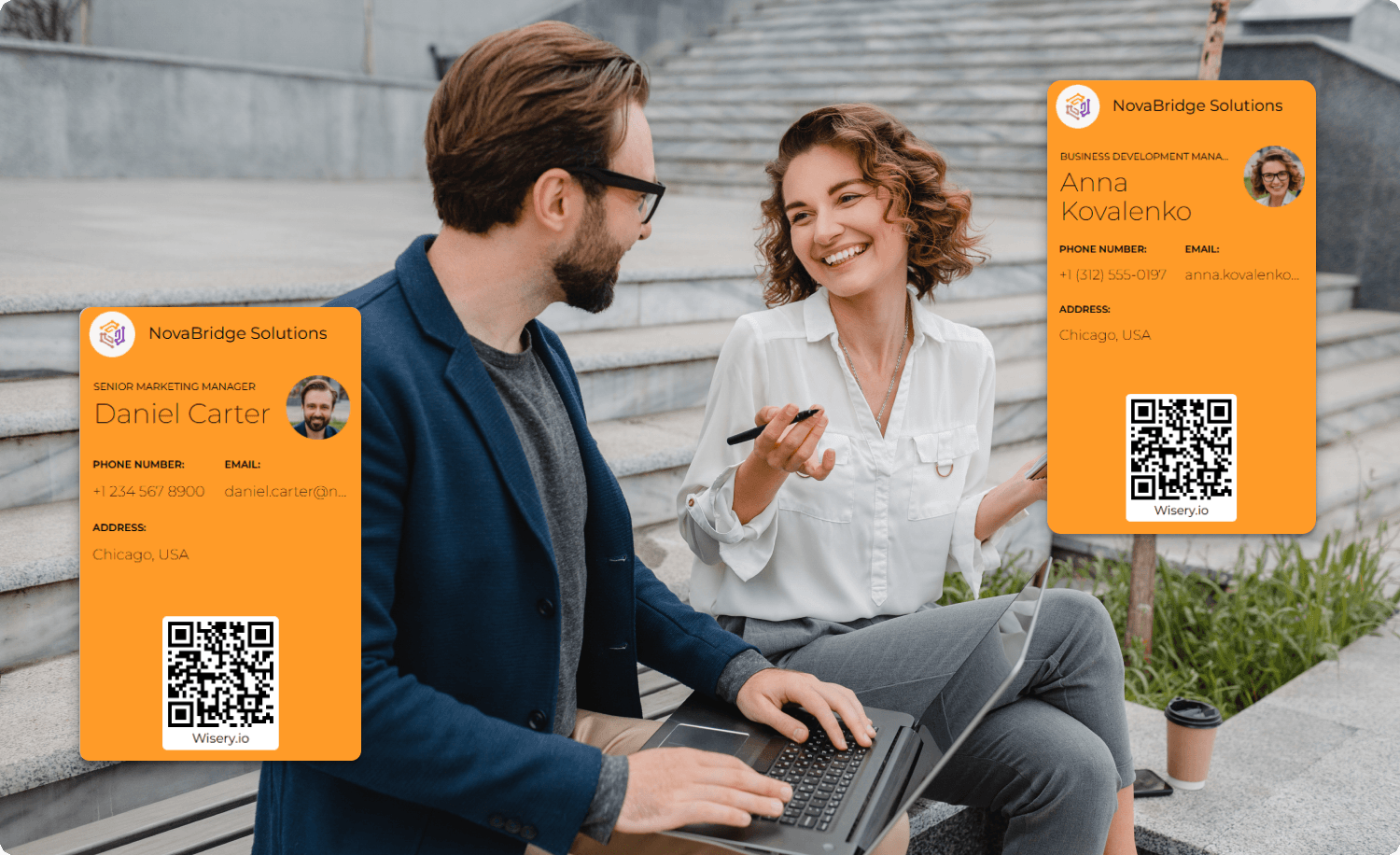
QR codes work differently. They’re visual patterns that any smartphone camera can scan, no special proximity needed. Both methods do the same job: your contact info, website, LinkedIn, whatever you want – it all pops up on their screen instantly. The friction just disappears. No more business card graveyards in desk drawers.
The Core Framework: How NFC and RFID Power Modern Networking
Here’s where things get technical, but understanding how this stuff actually works helps you make better decisions when choosing cards for your team. A lot of companies jump into NFC business cards without knowing what’s under the hood. They order a batch, hand them out, then realize the cards don’t do what they expected.
Maybe the storage is too small for their needs, or they assumed cards need to be charged (they don’t), or they’re confused about why some phones read the card instantly while others require precise positioning. Understanding these basics helps businesses choose cards that match their actual networking needs.
Understanding the NTAG Series: Storage and Performance
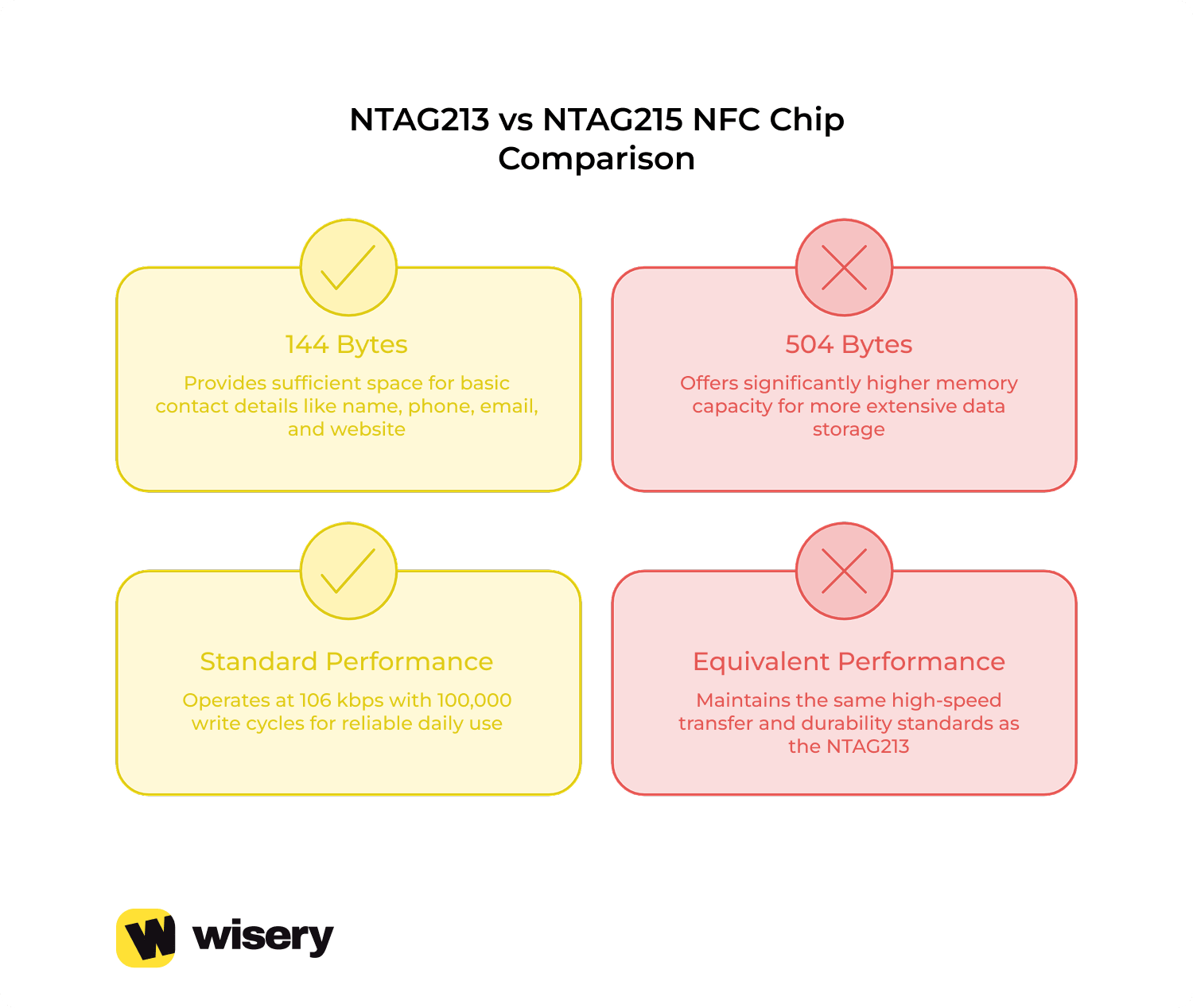
When it comes to NFC business cards, NTAG chips are the industry standard. While several variants exist, the NTAG213 and NTAG215 are by far the most popular. The difference? Storage capacity. NTAG213 provides 144 bytes of usable memory – enough for a contact card with your name, phone number, email, and a website link. NTAG215 bumps that up to 504 bytes.
Sounds small compared to your phone’s storage, right? But for transferring basic contact info, it’s more than enough. You’re not storing photos here; you’re storing text data that tells a phone where to go. Transfer speed matters less than you’d think. These chips exchange data at a rate of about 106 kbps. And if you think that’s slow, you’d be wrong, since we’re talking about milliseconds here.
Tap your card, the data moves, done. The real advantage is durability. NTAG chips can withstand approximately 100,000 write cycles. This means you can update the link to your profile or your phone number tens of thousands of times before the chip fails. In practice, the card’s physical material will break before the chip fails.
Passive vs. Active NFC: Why Your Card Doesn’t Need a Battery
This confuses people sometimes. How does a card without a battery power anything? The answer is electromagnetic induction. Basically, your smartphone does all the work. When you hold an NFC card up to a device, its NFC reader generates a small electromagnetic field. This field interacts with the coil inside the card, creating a weak electric current. Just enough to power the chip for a second and send its data back to the phone.
It’s passive technology. The card sits there doing nothing until a phone activates it. Active NFC devices differ in that they have their own power source and can initiate communication independently. Think of payment terminals at stores. But for business cards? Passive makes way more sense. No charging, no batteries dying at the worst moment during a pitch meeting. Your card works the same way on day one as it does three years later.
NFC vs. QR Code Business Cards: Enhancing the Customer Experience
Both technologies work. But they work differently, and that difference matters depending on where and how you’re networking. Maybe you’ve seen people swear by NFC chips, calling QR codes “outdated.” And perhaps you’ve even witnessed how those same people felt frustrated when their old iPhone model didn’t support NFC properly. But who says the choice has to be limited to just one thing?
You can simply explore these solutions and understand the situations in which each one shines. The comparison boils down to three main factors: accessibility, speed, and the “wow” factor. NFC feels premium. You tap, things happen, people are impressed. QR codes feel familiar – everyone’s scanned one at a restaurant or event. They’re not flashy, but they work every single time if the person has a camera. Let’s dig into where each technology actually wins in real networking situations.
The Seamless Tap: Where NFC Wins
NFC works best when speed and a smooth in-person experience matter. For example, let’s say you met a potential client at a conference. Conversation’s going well. You tap your card against their phone – no scanning, no angling, no “hold on, let me open my camera.” One second, your contact info is on their screen. That smoothness matters more than it sounds.
The UI/UX advantage is real. People notice the tap. It feels modern, almost futuristic, even though the technology’s been around for years. There’s a status element to it, too – handing someone an NFC card signals you’re invested in quality tools. It’s the same psychological effect as having a well-designed website versus a clunky one. First impressions happen fast.
When it comes to speed, NFC has no rivals at close range. On average, it takes 0.5 to 1 second from contact to data transfer. Take QR codes, for example, where there are many more steps involved, so the entire process can take up to 5 seconds. It’s not a huge difference, but in conversation, this gap creates unnecessary awkward pauses and spoils the experience.
The downside? Not all phones support NFC. Older Android models sometimes have NFC disabled by default. iPhones before the XS occasionally struggle with certain chip positions. And if someone’s phone case is too thick, the electromagnetic field doesn’t penetrate properly. When NFC fails, it fails hard – you’re left standing there looking silly while nothing happens.
The Universal Bridge: Why QR Codes Are Still Essential
If you’re excited about the benefits of NFC, it’s understandable, since it’s very convenient. However, don’t be too quick to give up on QR codes, because they are the most versatile way to share information. Any smartphone released in the last decade can scan a QR code. The real advantage shows up in group settings or distance scenarios.
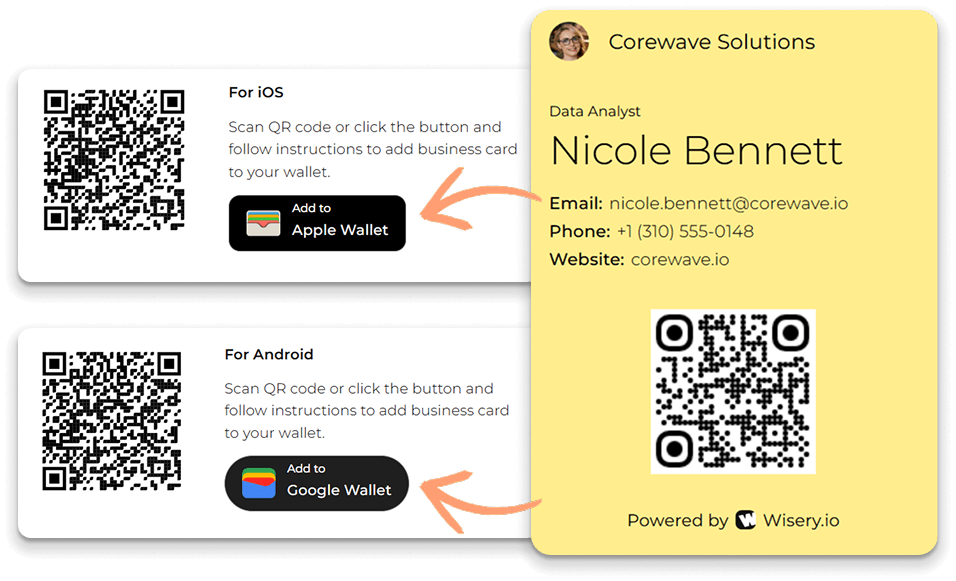
You’re giving a presentation and want 30 people to have your contact information. You can’t exchange contact details with 30 people one by one. But you can place your QR code on the last slide, and everyone can scan it simultaneously. The same logic applies to printed materials, such as flyers, posters, and event name tags. QR codes work through screens, too.
Someone can take a screenshot of your digital business card and share it in a group chat. Try doing that with an NFC tap. It’s also worth considering familiarity. QR codes became ubiquitous during the COVID pandemic, when the entire restaurant industry switched to QR menus. Hand someone an NFC card, and you might need to say, “Just tap it against your phone.” Show someone a QR code, and they already know the drill.
Flexibility in terms of distance also plays an important role. QR codes can be scanned from a distance of 10–15 centimeters, and with high-resolution cameras, sometimes even from further away. This means that the other person doesn’t need to physically touch your business card or get too close.
NFC vs. QR Code: Quick Comparison
Factor | NFC | QR Code |
Accessibility | Requires an NFC-enabled phone (not all iPhones/Androids support it smoothly) | Works on any phone with a camera – universal compatibility |
Speed | 0.5-1 second tap – fastest option when it works | 3-5 seconds (open camera, scan, tap notification) |
Wow-Factor | High – feels premium and modern during in-person meetings | Low – familiar but not impressive |
Distance | Must be within 1-4 cm – very close proximity needed | Works from 10-15 cm away – more comfortable range |
Group Sharing | One-on-one only – can’t share with multiple people at once | Can be displayed on screen or printed for groups |
Failure Rate | Can fail with thick phone cases, disabled NFC, or wrong positioning | Rarely fails unless the lighting is terrible or the code is damaged |
For most businesses, the most reliable option is a hybrid card that combines NFC with a printed QR code. Build an NFC chip into it and place a QR code on the back. Use NFC for convenient, one-touch data sharing. The QR code will come in handy if someone’s phone doesn’t support this feature or when you’re giving a presentation to a group. Either way, you’ll be prepared for any situation and won’t have to rely on a single technology working 100% of the time.
Behind the Link: The Software Architecture of Digital Cards
So you’ve got the hardware part down – chips, codes, electromagnetic fields. But here’s what most people miss: the hardware is just a delivery mechanism. The real functionality lives in the software layer. What happens after someone taps your card or scans your code? Where does that data actually go, and how much control do you have over it?
Digital business cards fall into two categories: static and dynamic. The first one has static data hardcoded into the chip – your name, phone number, email, maybe a website link. That’s it. Once it’s programmed, it’s locked. Want to change your phone number? You’re throwing that card away and ordering a new one. Dynamic encoding doesn’t store your actual contact details.
It stores a redirect link to your cloud profile that you can edit at any time. Same physical card, but the information it delivers can change whenever you want. The architectural differences matter more as your business scales. One employee with a static card isn’t a big deal. A sales team of 50 people with static cards becomes a logistical nightmare the moment someone gets promoted or changes departments.
Static vs. Dynamic Encoding: Why Data Flexibility Matters
Static encoding is straightforward. Your contact info gets written directly to the NFC chip or embedded in the QR code as plain text. When someone scans it, their phone reads that text and creates a contact entry. No internet required, no middleman, just raw data transfer. Cheap to produce, simple to understand. The problem shows up when life happens. Your area code changes. You get a new email domain after a rebrand.
Your LinkedIn URL updates. With static encoding, every change means reprinting or reprogramming cards. If you’ve already handed out 200 cards at a conference, those are now outdated. People are saving the wrong contact info, and you can’t fix it. Dynamic encoding flips the model. Instead of storing your contact details directly, the chip or QR code contains a redirect URL, such as yourcompany.com/card/johnsmith.
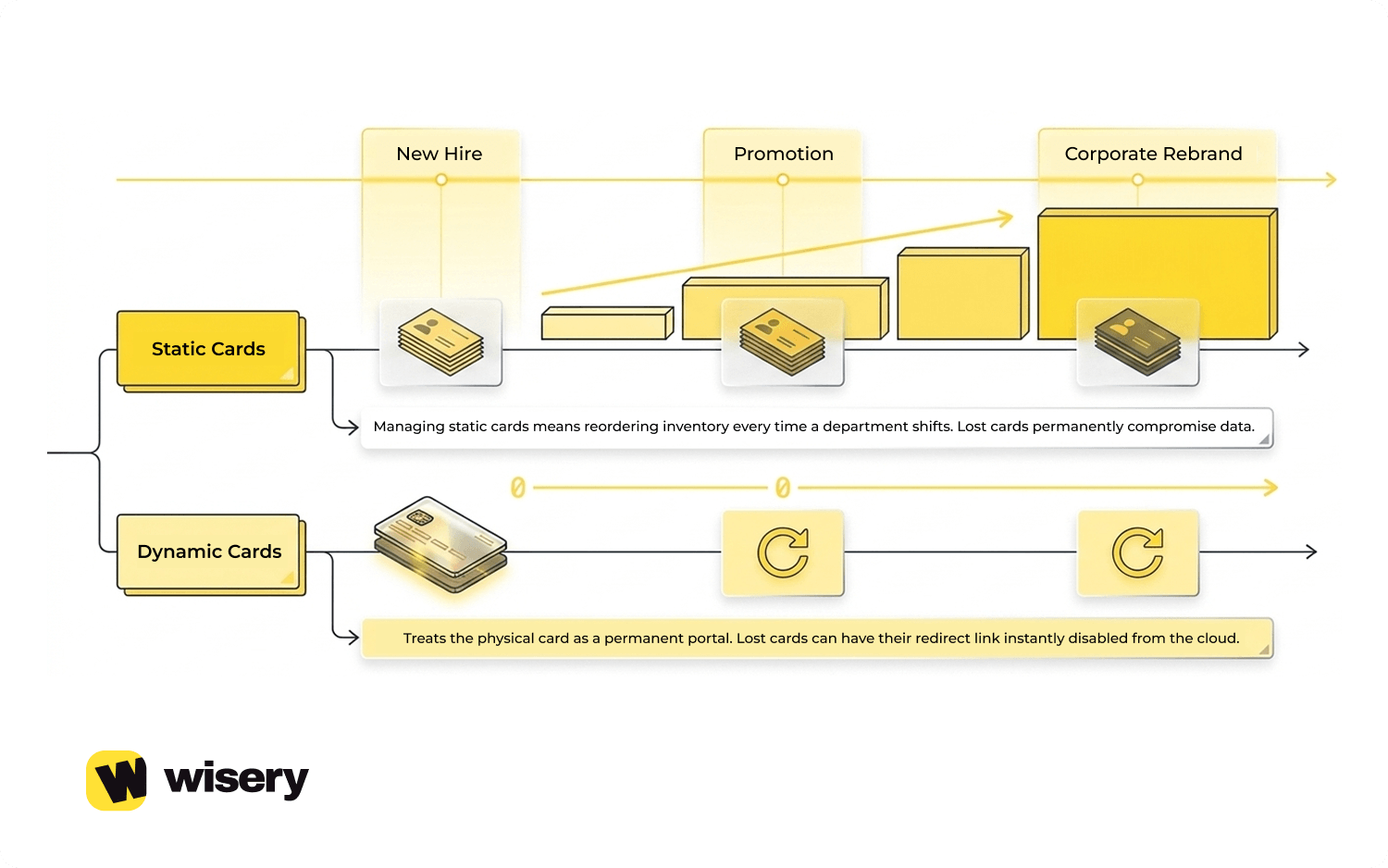
When someone scans it, they’re sent to a cloud-hosted profile page. That page displays your current information and offers a “Save Contact” button. Behind the scenes, it either generates a vCard file or integrates directly with the phone’s contact app. The advantage is obvious: you control the profile, not the card. Your job title changes? Log in to your dashboard, update it, and you’re done.
Every card you’ve ever handed out now points to the new info. This is the model used by platforms such as Wisery: the physical card stays the same, while the profile behind it can be updated through a dashboard. You edit your profile once, and the changes propagate to anyone who’s ever scanned your card. No reprints, no wasted inventory, no outdated information floating around.

Cloud-Based Contact Management and CRM Syncing
Here’s where things get practical for businesses. Consumer-level digital cards are fine for freelancers and solo professionals. But companies with actual sales pipelines need more than just contact transfers. They need data flowing into their CRM systems: HubSpot, Salesforce, Pipedrive, whatever they’re using to track leads. Cloud-based platforms handle this through vCard files and API integrations.
When someone scans your card, the system doesn’t just show them your phone number. It packages your information into a vCard file – a standardized format that phones and CRMs both recognize. The recipient’s phone automatically imports it into their contact list. Meanwhile, if the platform has CRM syncing enabled, that same interaction is logged in your dashboard. You can see who scanned your card, when, and where.
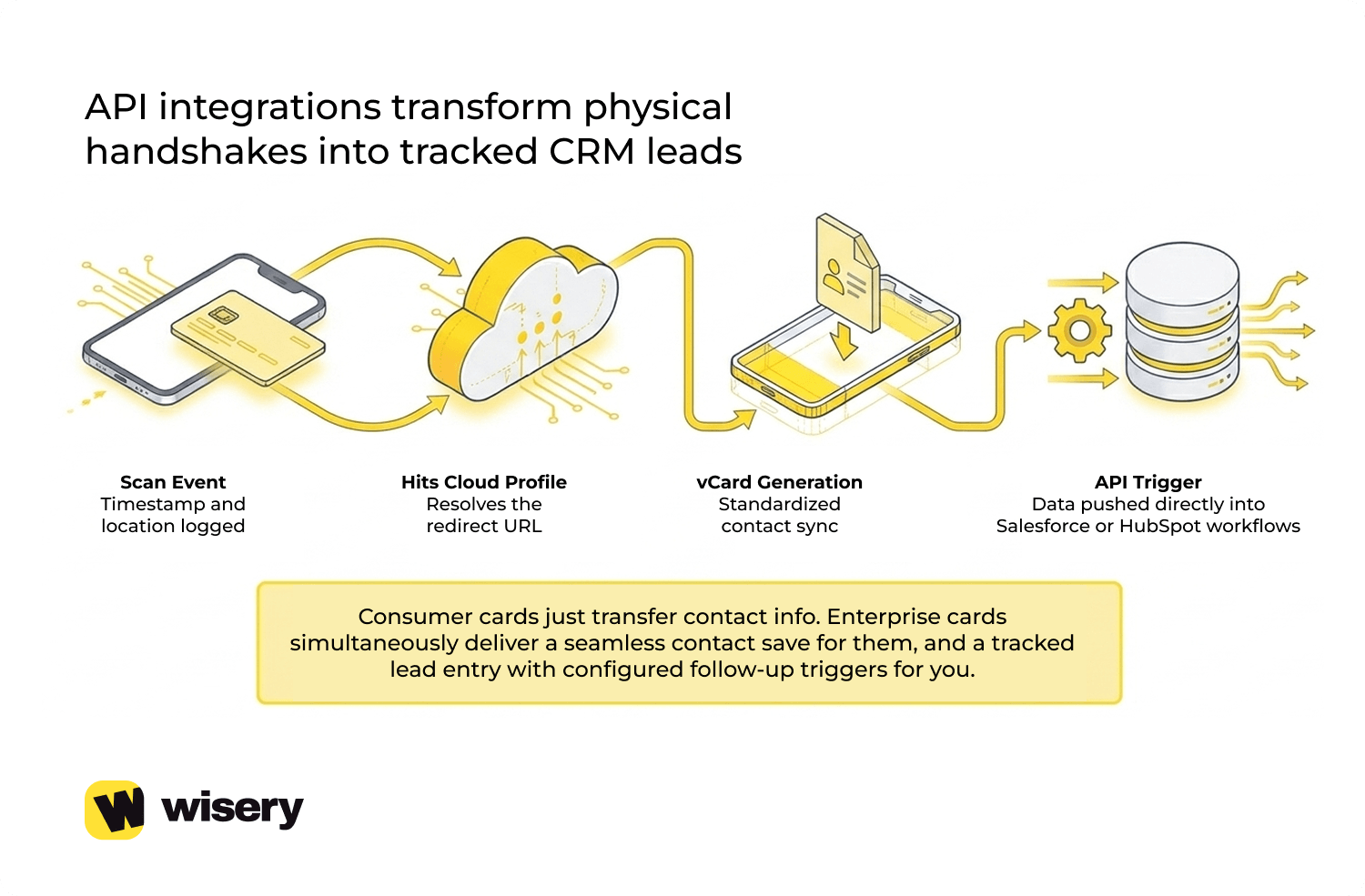 Some systems even trigger follow-up workflows – automated emails, task reminders for your sales team, lead scoring updates. The technical flow works like this: someone scans your card → redirect hits your cloud profile → profile generates a vCard with your current details → vCard gets delivered to their phone → simultaneously, the scan event sends data back to your CRM via API. The person scanning your card sees a seamless contact save. You see a new lead entry with timestamp and location data.
Security matters here, too, which is why platforms like Wisery emphasize GDPR compliance. All that data flowing between phones, cloud servers, and CRM systems needs to be encrypted. You don’t want contact details leaking or scan data getting intercepted. Most reputable platforms use HTTPS for all transfers and encrypt stored profile information. Still, it’s worth asking about a provider’s data-handling policies before committing. Not everyone takes privacy seriously, especially smaller vendors rushing cheap NFC cards to market.
Security Protocols in Business Card Technology
When it comes to digital business cards, security concerns inevitably arise. People immediately go to “Can someone hack this?” The concern is understandable. You’re transmitting data wirelessly, storing data in the cloud, and connecting to databases. Sounds like a lot of ways things could go sideways. However, many users focus on less likely risks while overlooking more practical privacy issues.
They’re paranoid about someone cloning their NFC chip at Starbucks; meanwhile, they may be using a free QR code generator that collects scan data for analytics or ad purposes. The actual security landscape is messier than “safe” or “not safe.” Some platforms take it seriously, encrypt everything, and follow regulations. Others just slap an NFC sticker on plastic and call it a day.
Protecting Your Data: Encryption and Privacy Standards
When someone taps your card or scans your QR code, what actually happens to that data? It moves. From the chip in their phone to the server that hosts their profile, and sometimes onward to a CRM. Multiple hops. Each one’s a potential weak point. HTTPS handles the “in motion” part. Encrypts the data while it’s traveling.
So if someone’s sitting in the same coffee shop trying to intercept wireless signals, they’d just see encrypted junk instead of your email address. That’s good. The problem is, HTTPS doesn’t do anything for data sitting still. Is your profile stored on a company’s server? That needs a different encryption. And not everyone bothers with it.
Wisery actually built their platform with GDPR baked in from the start – consent tracking, data deletion tools, the whole thing. Because getting hit with a GDPR fine isn’t a joke. We’re talking percentages of global revenue, not fixed dollar amounts. Even if you’re US-based and think “GDPR doesn’t apply to me,” it does the second you hand a card to someone from Germany at a Vegas conference. So yeah, might want to check if your provider takes that seriously.
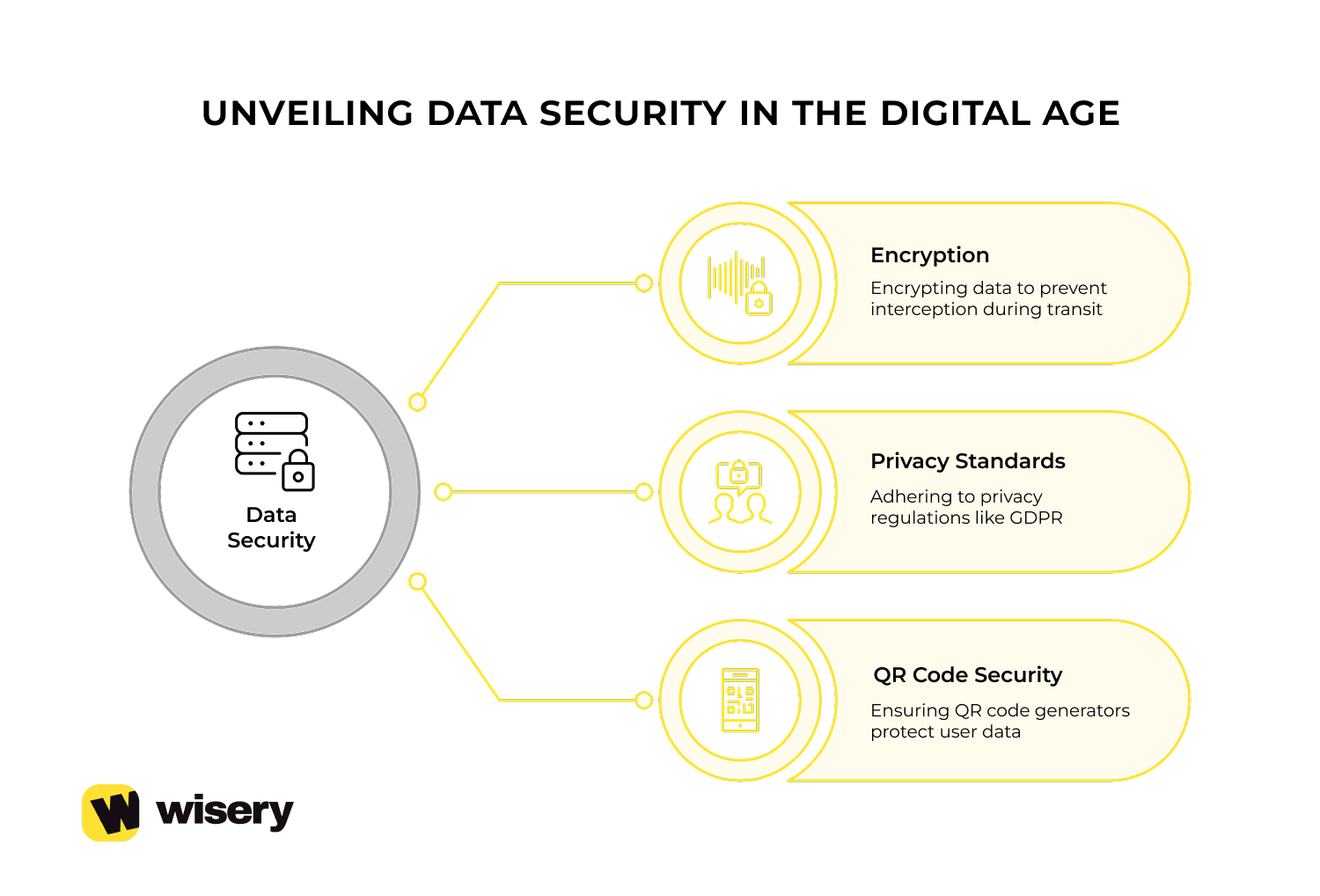
Then there’s this thing nobody talks about – free QR generators. You Google “free QR code,” pick the first result, and generate a code for your contact info. Convenient. Also, possibly selling your data. Some free QR code services may track scan data or use it for analytics and advertising, so businesses should review their privacy policies before using them.
Anti-Collision and Locking Features for NFC Chips
Can someone just walk up and rewrite your NFC chip? People ask this constantly. Short answer: not if you locked it, and you should’ve. NFC chips – the NTAG ones everyone uses – have write-protection. You program your data, then you set a lock bit. After that, the chip’s read-only. Anyone can scan it, but modifying the data requires physically destroying the chip. Which defeats the purpose of trying to tamper with it in the first place.
Anti-collision is a different thing, handling situations where multiple NFC signals overlap. Trade show floor, hundreds of people with phones and cards. How does your phone know which card to read when five people brush past you? ISO 14443 spec solves this with unique IDs. Each chip broadcasts a UID, the phone picks the strongest/closest signal, and ignores the rest. Otherwise, you’d accidentally scan someone else’s card from three feet away.
Cloning gets brought up a lot. “What if someone copies my chip?” Well, they can. NFC readers exist; they’re not expensive. Someone could scan your chip and duplicate the data onto a blank NTAG. But here’s the thing – what are they actually stealing? Your contact information that you deliberately give to strangers anyway?
The scenario where cloning matters is if your card doubles as an access badge or payment method. Then yeah, cloning becomes a real problem. But for basic contact-sharing cards? It’s like being worried someone will photocopy your paper business card. Sure, they could. Why would they? Losing your card is a legitimate concern.
Someone finds it, they’ve got your details, and if it’s a static-encoded card, there’s nothing you can do about it. Dynamic encoding helps here – the card just holds a redirect link, you control the destination. Card gets lost? Log in to your dashboard, disable that specific card’s link. It stops working immediately. Anyone who finds it and scans it gets nothing. Static cards don’t have that option. Once they’re out in the world, they’re live until they physically break.
Future Trends: The Next Frontier of Networking Tech
Business card technology isn’t standing still. What works today: NFC taps or QR scans, that’s already becoming the baseline. Companies are looking ahead, testing things that sound straight out of sci-fi but are closer to reality than you’d think. Some of it’s genuinely useful. Some of it feels like tech for tech’s sake, solutions hunting for problems that don’t really exist yet.
We’ve been watching a few trends that’ll probably shape how we network over the next few years. AR integration, ultra-wideband distance sharing, and eco-friendly hardware materials. Not all of it will take off. But enough companies are investing in these directions that at least one or two will become standard. Let’s break down what’s actually coming and what’s still vaporware.
AR: Business Card Technology for Immersive Networking
Augmented reality on business cards isn’t new, since people have been experimenting with it since 2015. What’s changed is execution. Early AR cards were gimmicky. You’d scan a QR code, it’d launch some clunky app, struggle to recognize the card, then show you a spinning 3D logo that lagged on half the phones. Nobody wanted to deal with that at a networking event. Today, AR is emerging as one of the more innovative business card alternatives, turning a simple contact exchange into an interactive experience.
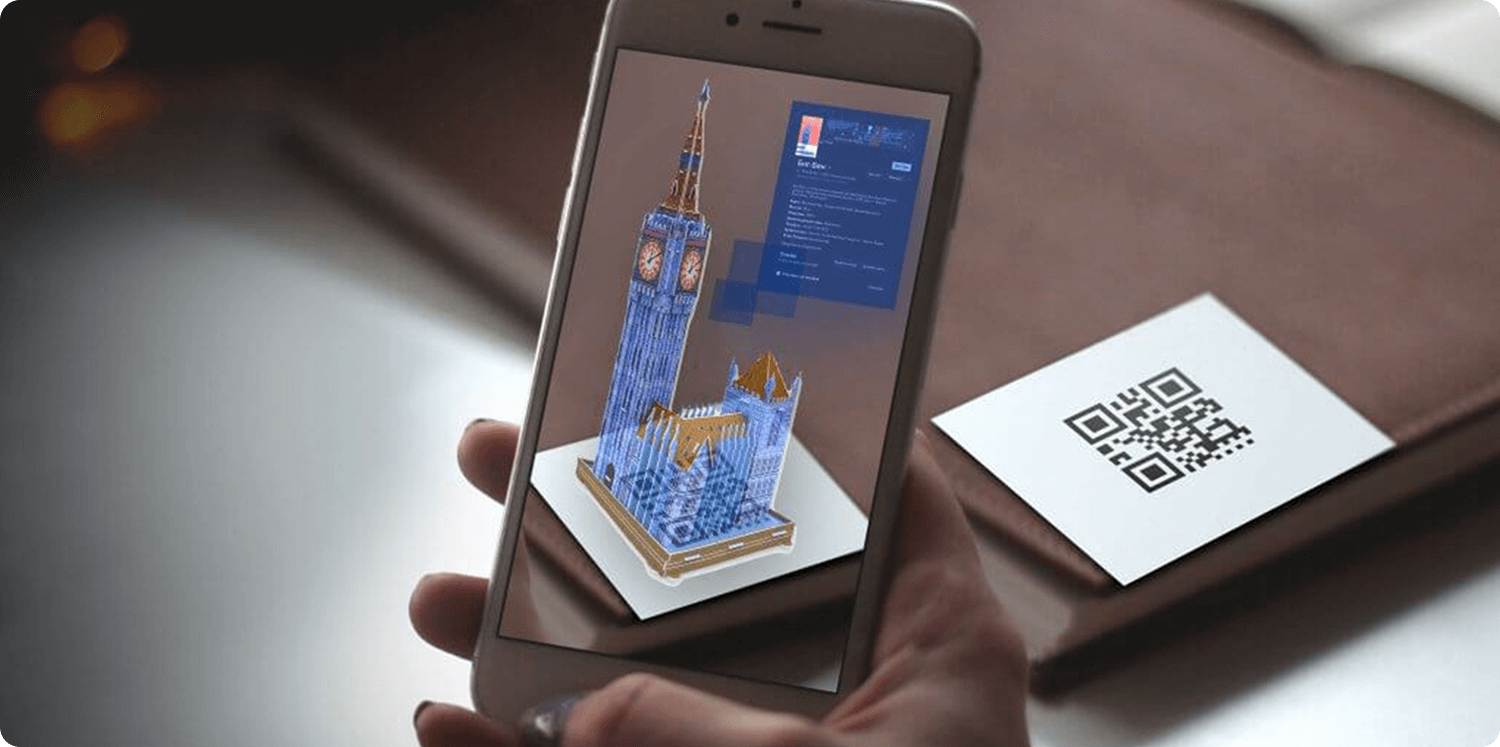
Now? AR works through native camera apps. No downloads, no third-party software. You point your phone at the card, and the camera recognizes it as an AR trigger. What pops up depends on what the card creator programmed. Could be a 3D version of their portfolio. Could be a video introduction – “Hey, I’m Sarah, here’s what we do” – playing over the physical card. Could be an interactive product demo floating above the table.
The engagement boost is real. Static cards get glanced at and pocketed. AR cards make people stop and interact. The downside is cost and complexity. Building AR experiences isn’t cheap unless you’re using templates, and templates look like templates. Custom AR development means hiring designers who know ARKit or ARCore, testing across devices, and dealing with lighting conditions that mess up recognition. For a freelance consultant? Probably overkill. For a real estate developer trying to stand out at luxury property expos? Makes sense.
Ultra-Wideband (UWB) and Distance Sharing
UWB is the tech most people haven’t heard of but are already using if they own a newer iPhone. It’s what makes AirTags work – precise distance and direction tracking between devices. Apple, Samsung, and a few others have been building UWB chips into flagship phones since around 2019.
For business cards, UWB opens up a weird but potentially useful scenario: sharing contact info without touching anything. You walk into a room, your phone detects someone else’s UWB-enabled business card within a few meters, and prompts you to connect. You tap “accept” on your screen, and their info saves to your contacts. No card exchange, no physical proximity, just passive detection.
Sounds convenient until you think through the implications. Do you really want your phone buzzing every time you’re near someone with a UWB card? At a conference with 500 attendees, your phone would be going off constantly. So there’d need to be permission layers – maybe you enable “networking mode” during specific events, or people have to mutually opt-in before info transfers.
The range is the selling point, though. UWB can achieve directional accuracy up to 10-15 meters. NFC maxes out at 4 centimeters. QR codes need line of sight. UWB could, in theory, let you exchange information with everyone in a meeting room simultaneously without anyone pulling out cards or phones.
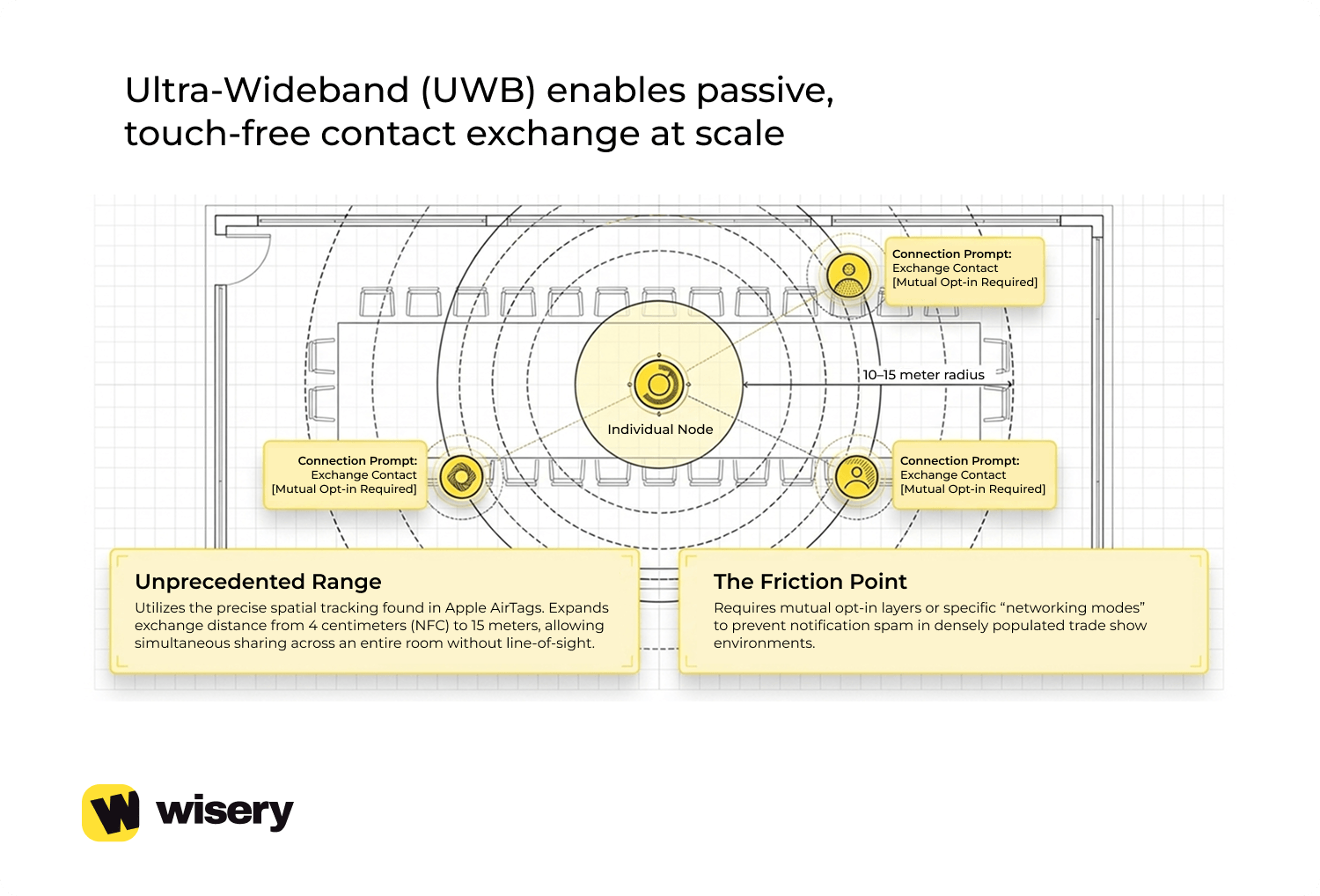
Just… everyone’s contact details flowing around wirelessly while you’re presenting. Creepy? Maybe. Efficient? Definitely. It is unlikely to replace NFC or QR codes anytime soon. But as a supplementary feature for high-volume networking scenarios – trade shows, conferences, industry mixers – it could reduce the tedious card-swapping and let people focus on actual conversations.
Sustainable Hardware: Eco-Tech Materials in Micro-Electronics
Here’s the trend that actually matters if you care about not trashing the planet: eco-friendly card materials that still support NFC chips. Traditional business cards are plastic – PVC, usually. Cheap, durable, takes 400+ years to decompose in a landfill. The NFC chip itself isn’t biodegradable either, so you’ve got electronic waste mixed in.
Companies are starting to offer alternatives. Wood-based cards with embedded chips. Bioplastic made from cornstarch or sugarcane breaks down within a few years rather than over centuries. Recycled ocean plastic pressed into card form. Some manufacturers are even testing fully compostable NFC antennas, though those aren’t commercially available yet.
The wood cards are interesting. They look and feel premium – way more tactile than plastic. The NFC chip sits in a small recess, usually sealed with a thin layer of resin to protect it. Durability’s actually decent if they’re treated properly. The main issue is cost – eco-materials cost 2-3x as much as standard plastic cards. For individuals, whatever. For a company ordering 5,000 cards, that price difference adds up fast.
Bioplastic cards are closer to cost parity with traditional PVC, but they’re less durable. They can warp in heat, scratch more easily, and sometimes degrade faster than you’d want. You don’t want your business card falling apart after a year. Needs more R&D before it’s a true replacement. The shift toward sustainable hardware isn’t just idealistic – it’s becoming a brand-positioning imperative.
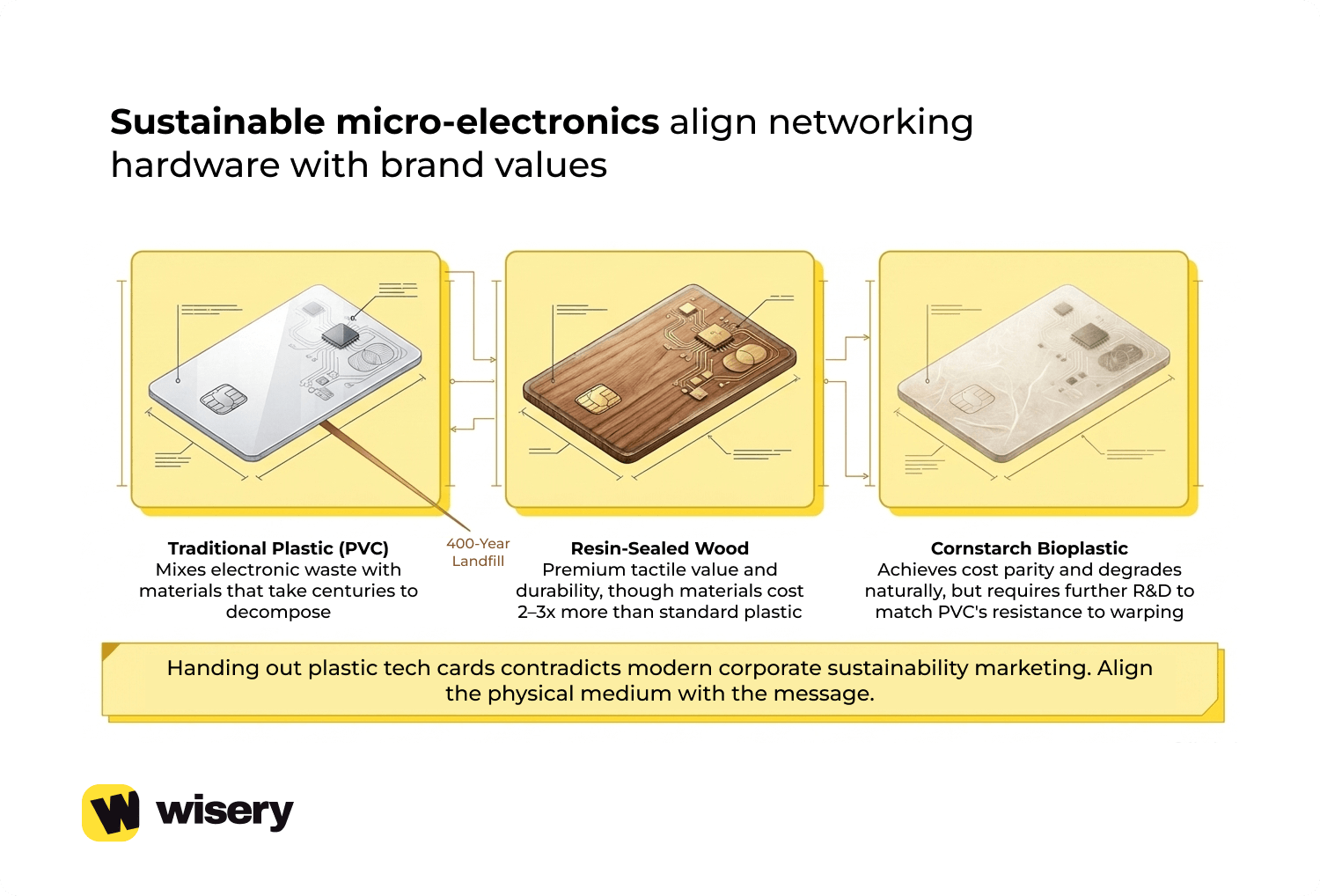
Companies that talk about sustainability in their marketing but hand out plastic NFC cards look inconsistent. Some startups specifically market themselves as “the eco-friendly digital business card” and use biodegradable materials as a selling point. Whether that resonates with customers enough to justify the cost? Depends on the industry. Tech companies and B-corporations care. In more conservative industries, sustainability may be a secondary factor compared with durability, cost, and data security.
And if you’re still sitting on a stack of traditional cards from previous events, check out our guide on What to Do with Old Business Cards for practical ways to recycle, repurpose, or digitize them.
Frequently Asked Questions
What technology is used in modern digital business cards?
Two main technologies: NFC chips and QR codes. NFC (Near Field Communication) uses NTAG chips from NXP Semiconductors – tiny circuits embedded in the card that communicate with smartphones when you tap them together. Works within 1-4 centimeters. QR codes are printed patterns that any phone camera can scan from a distance.
Both trigger the same result – your contact info transfers to the other person’s phone instantly. Some cards use both technologies together for redundancy. The smarter ones also connect to cloud platforms where you can update your details without having to reprint the card.
How can I use technology to make my business card stand out?
Honestly? Don’t rely on tech alone to stand out – a gimmicky card with nothing behind it just looks desperate. That said, if you’re using the tech smartly, a few things work. AR integration can be impressive when done well – imagine showing a 3D portfolio or a video intro when someone scans your card.
Dynamic profiles that link to case studies or live portfolio work instead of just static contact info. Real-time analytics so you know who scanned your card and when, letting you follow up strategically instead of randomly. The trick is matching the tech to your industry. AR makes sense for architects or designers. Real-time CRM syncing matters more for sales teams. Pick what actually serves your networking goals, not what sounds coolest.
What is the NFC chip in a business card, and how does it work?
It’s a small circuit, usually an NTAG213 or NTAG215, embedded inside the card. The chip doesn’t have a battery. Instead, it uses passive power from your phone’s NFC reader. When you tap the card against a phone, the phone generates an electromagnetic field. That field induces a current in the chip’s antenna coil, just enough to power the chip for a second.
The chip then transmits its stored data back to the phone. Could be a vCard file with your contact details, or more commonly, a redirect URL to your cloud profile. The entire transaction takes place in under a second. Once you program the chip with your information, you can lock it so nobody can overwrite it. From that point, it’s read-only – scannable but not editable.
Is Augmented Reality (AR) the future of business cards?
Future? Maybe for certain industries. Universal standard? Probably not. AR works great when you need to show something visual or interactive – architects displaying 3D building models, product designers showing prototypes in motion, real estate agents giving virtual property tours. In those contexts, AR adds genuine value and makes your card memorable.
But for most professionals – consultants, lawyers, accountants, sales reps – AR feels like overkill. You don’t need augmented reality to share your phone number and LinkedIn profile. The tech also adds cost and complexity. Custom AR experiences aren’t cheap to develop, and template-based ones look generic. I think AR becomes a niche feature for specific use cases rather than replacing NFC or QR codes entirely. It’s a tool in the toolkit, not the whole toolkit.

Viktoriia is a Marketing Manager at Wisery. She drives the brand’s digital presence through strategic content creation. From crafting insightful articles to designing high-impact email campaigns, she ensures Wisery’s mission reaches a global audience. She loves how Wisery simplifies the contact routine for professionals. Viktoriia personally uses it at marketing conferences to turn quick introductions into lasting LinkedIn connections. Away from her desk, she recharges with a good book or her cats.